Marking Is Not Deleting
SpaceMan 99 never deletes a file the moment you choose it. You mark the files you want to remove, as you find them, on any tab. They collect on the Marked tab, where you can review the whole set, and nothing leaves your disk until you press Delete Marked... there and confirm.
So marking is safe to experiment with: mark, look again, unmark.
Marking files
- The checkbox beside a file
 .
Every file on the Folder Contents, Duplicates and Largest Files tabs has
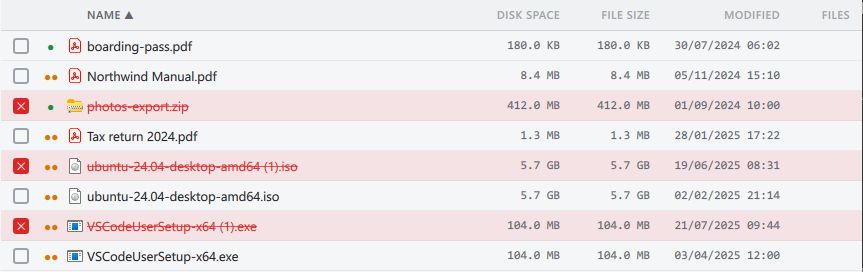
one. A marked file's checkbox is red, with a cross
.
Every file on the Folder Contents, Duplicates and Largest Files tabs has
one. A marked file's checkbox is red, with a cross
 ,
and its name is red and struck through. Ticking a checkbox does not change
which rows are selected.
,
and its name is red and struck through. Ticking a checkbox does not change
which rows are selected. - Several files at once. Select files on the Folder Contents or Largest Files tab (click, Shift+click and Ctrl+click work as they do in File Explorer), then press Mark Selected, or Ctrl+M. If everything selected is already marked, the same button unmarks it.
- The right-click menu on a file has Mark and Unmark.
Folders cannot be marked themselves. To mark everything in a folder, use Mark all in folder on the folder tree's right-click menu, which needs a Pro license.
A file is either marked or not, everywhere: mark it on the Duplicates tab and it shows as marked on the Folder Contents tab too.
Seeing what is marked
Whenever anything is marked:
- the Marked tab shows a red badge with the number of marked files;
- the status bar shows Marked: with the number of files and their total size;
- the Overview tab shows a Pending Cleanup card, whose Review & Delete button takes you to the Marked tab (it does not delete anything).
Unmarking
- Untick the file's checkbox, on any tab.
- Select files and press Unmark Selected.
- On the Marked tab, the Delete key unmarks the selected files. It does not delete them.
- Clear All on the Marked tab unmarks everything at once. It does not ask first, and cannot be undone.
Marking for you, in bulk
Marking files one at a time is free. The commands that mark many files for you by rule need a Pro license:
- Bulk Mark Duplicates on the Duplicates tab, which keeps the newest or oldest copy in every group, or uses a scanned folder selected in the tree to decide which copies go;
- Keep only this copy, Mark all but newest and Mark all but oldest on a duplicate group's right-click menu;
- Mark all in folder on the folder tree's right-click menu.
Without a license these commands still work out what they would mark, and tell you how many files and how much space that would be, but mark nothing.
How long marks last
Marks last until you close SpaceMan 99. They are not saved, so a cleanup has to be finished in one session.
When you delete marked files, the ones that were deleted leave the list. Any that could not be deleted, or that were not reached because you canceled the delete, stay marked, so you can try again.