SpaceMan 99 Pro
SpaceMan 99 is free for non-commercial use. The free license scans your own drives, finds duplicates, and lets you mark and delete files and read every report. A Pro license allows commercial use, and adds:
| Pro adds | Free, without it |
|---|---|
| Scanning network locations: folders on other computers and network drives. | Browsing network locations, and seeing what is in them. |
| Marking files for you in bulk: the Bulk Mark Duplicates rules, Keep only this copy, Mark all but newest, Mark all but oldest, and Mark all in folder. | Marking files one at a time with their checkboxes, Mark Selected and Ctrl+M, and every kind of unmarking. |
| Saving, printing and copying reports. | Generating every report, and reading it in every view. |
Everything else is the same with either license.
What you see without a license
Without a Pro license, a banner across the top of the main window says FREE, and that the free license is for non-commercial use. Its Buy button opens the Pro license dialog (below).
The Pro features stay visible, so you can see what they would do:
- In the folder tree, a padlock
 takes the place of the checkbox on network folders. Clicking it explains
what Pro adds.
takes the place of the checkbox on network folders. Clicking it explains
what Pro adds. - The bulk marking commands carry a PRO chip
 . They still
work out what they would mark, and tell you how many files and how much
space, but mark nothing.
. They still
work out what they would mark, and tell you how many files and how much
space, but mark nothing. - In the Reports window, Copy to Clipboard, Export... and Print... carry a PRO chip, and pressing one explains what Pro adds.
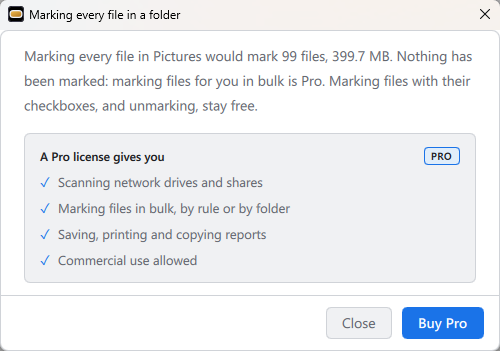
Each explanation ends with what a Pro license gives you, and a Buy Pro button that opens the Pro license dialog.
Buying and activating a license
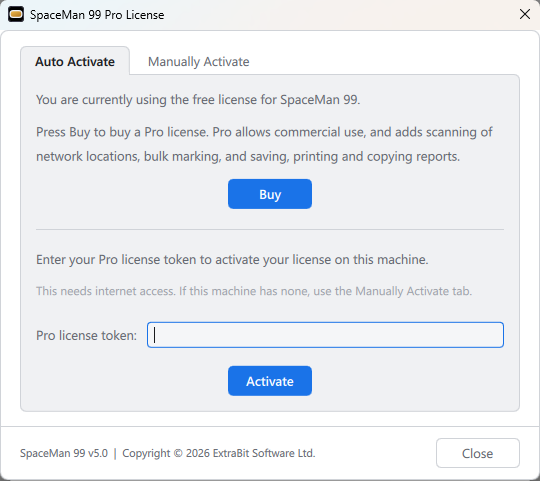
The SpaceMan 99 Pro License dialog opens from any Buy or Buy Pro button: on the FREE banner, in an upgrade explanation, or on the About tab of Settings. It has two tabs.
Auto Activate is for a computer with internet access:
- Press Buy to buy a Pro license on the ExtraBit website. You receive a Pro license token.
- Paste the token into Pro license token, and press Activate.
Manually Activate is for a computer without internet access:
- Press Copy to copy the computer's Fingerprint.
- On a computer that does have internet access, go to the link shown on the tab, and follow the instructions there. You receive the license key data.
- Copy the license key data to the clipboard, back on the computer being activated, and press Activate. SpaceMan 99 reads the license from the clipboard.
Once activated, the dialog confirms it, and the Pro features work straight away, with no need to restart SpaceMan 99. The FREE banner disappears, and the About tab of Settings shows whom SpaceMan 99 is licensed to.
Activation ties the license to the computer it was activated on. If you replace or rebuild that computer, SpaceMan 99 needs to be activated again.
If activation fails, the dialog says why. For questions about your license, contact [email protected].