
What is ExtraBits?
ExtraBits is an extension for the File Explorer application that comes with Windows (Note: this was called Windows Explorer in earlier versions of Windows). ExtraBits adds a number of time-saving commands to the context menu that appears when you right-click on a selection of files or folders.
Context Menu Integration
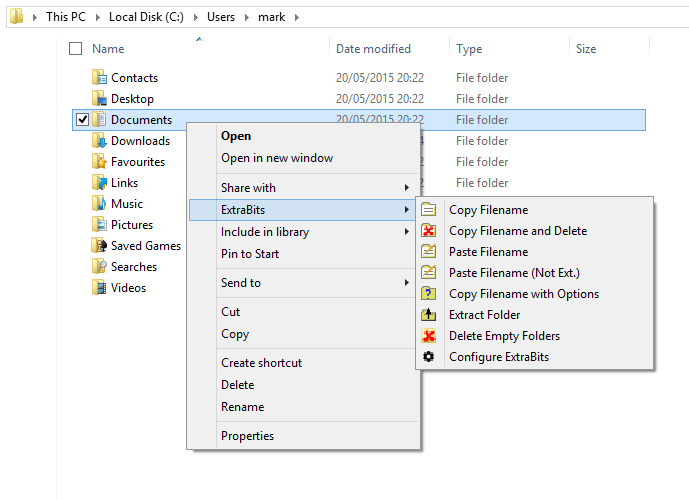
This screenshot shows the ExtraBits sub-menu that has been added to the File Explorer context menu, and the new commands that are available when the user has right-clicked on a single folder.
Key Features
Copy Filenames
Copy file or folder names to the clipboard. Hold SHIFT to copy full paths instead.
Advanced Copy Options
Format output with file size, dates, and custom text. Control separators and layout.
Multi Rename
Rename many files at once with pattern matching, numbering, and text editing.
Extract Folder
Move all contents out of a folder and delete the empty folder automatically.
Delete Empty Folders
Scan for and safely remove empty folders from your directory structure.
Configurable Menu
Hide unused commands and organize your context menu exactly how you want it.
Commands Available
These are the main commands added by ExtraBits:
| Copy Filenames | Copies the names of the selected files or folders to the Windows clipboard. Hold down the SHIFT key while selecting this command to copy the full paths to the selected files or folders. |
|---|---|
| Copy Filename with Options | Brings up a dialog that lets you set what file attributes are copied, such as file size and last modified date. Also lets you format the text generated by adding newline, spaces and other text. |
| Paste Filename | Renames a file or folder with the text on the clipboard. |
| Multi Rename | Lets you rename many files or folders at once. You can change any text they have in common, and add a prefix or suffix. If the names contain numbers, you can renumber or add/remove leading zeros. You can even copy the names to your favorite text editor for editing, and then paste back in the new names. |
| Extract Folder | Moves all the files and subfolders out of the selected folder, and then deletes the (now empty) folder. |
| Delete Empty Folders | Scans the selected folder for empty folders, and lets you delete them. |
| Configure ExtraBits | Lets you configure which of the ExtraBits commands are shown, and whether they are shown in the ExtraBits sub-menu, or in the main context menu. This allows you to hide commands that you never use, to avoid cluttering the menus. |